SurveilStar records and controls almost every activity of computer and Internet - emails, websites, instant messages, program activities, document operations, removable devices, printers, and many more. You can also watch real-time screen snapshots and remotely control computers in order to stop sabotage or data theft in time.
SurveilStar is a monitoring software which is designed for employee monitoring, parental control, preventing identity theft... purposes. It can benefit your company, family, government, school, even non-profit agents in
(1) Protecting intellectual property and commercial secrets.
(2) Preventing and stop sabotage and information theft.
(3) Preventing Internet/email abuse.
(4) Reducing workplace/home place slackers.
(5) Improving efficiency and productivity
No. SurveilStar monitoring Agent does not show up as an icon, does not appear in the Windows system tray, does not appear in Windows Programs, and does not show up in the Windows task list. Only IT manager or supervisor with administrator privilege can uninstall SurveilStar monitoring Agent. Unauthorized users cannot uninstall SurveilStar or delete history records.
No. Surveilstar is running in stealth mode and will not occupy too much CPU of your computers. No extra icons or shortcuts will display on the monitored computers' desktops or disks. No task is shown on Windows Task Manager... Nothing can be available to let the users be aware of the computer monitoring.
Yes. You can install the SurveilStar monitoring Agent to employees' computers in stealth mode. You can even deploy the monitoring system in remote mode. The monitoring application installed in the employee's computer will run in backstage, and the data transfer between monitoring Agent and Server is carried out in stealth mode.
Typically, most anti-virus software will not report Surveilstar and Surveilstar is also uploading certification files to these software agents in order to get approved. But accidents may happen. If the anti-virus software reports it, please add Surveilstar processes into your anti-virus software exceptional list. So they will skip scanning Surveilstar next time. You can rest your hearts on the safety issues because Surveilstar monitoring software will not do harm to your computers/Internet.
Yes, it is possible with Surveilstar enterprise edition. You can deploy the software across nets. The detailed instructions can be asked from Surveilstar Support Team.
Yes, Surveilstar Support Team is able to extend your trial to another 1 month. If you want to, please feel free to contact them.
Email Monitoring or employee monitoring is legal, you can use SurveilStar to monitor your employees' and record their working emails legally with an appropriate email policy announcement. Please check Legal Email Monitoring for more information.
SurveilStar Server requires at least 10 GB hard disk space. A dedicated data server with more than 50 GB hard disk space is recommended.
SurveilStar Console requires at least 10 MB hard disk space, while 100 MB is recommended.
SurveilStar Agent requires at least 10 MB hard disk space.
Surveilstar is a Window-based software for now which will not support realizing monitoring on iPad, iPhone or other smartphones, tablet pcs. But keep an eye on our website, our developers are working on this.
Please refer to Deploying SurveilStar PC/Internet Monitoring Software. A complete SurveilStar PC/Internet monitoring system consists of:
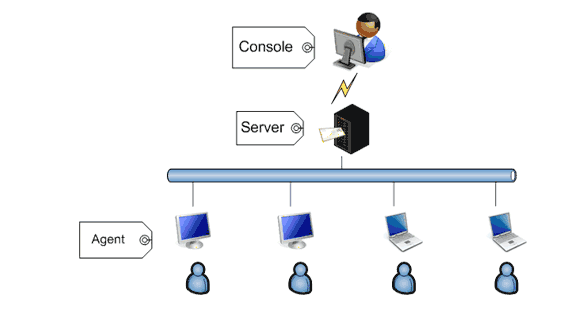
We are sorry for any inconvenience. Please refer to How To Uninstall Surveilstar from your PC.
Yes. System administrator can get detailed reports on the applications usages, websites visits, and traffic usages.
e.g. System administrator can learn which application is frequently used by the user, how may hours the user has spent on the web surfing, how may hours the user has spent on a particular site, and more!
Yes. You can setup different control policies to monitor the user's computer activities. Once the user triggers the event rule, you will receive an alert message. Click the alert message, you will be able to trace which user and when the user made unwanted attempts.
Step 1- Enter Surveilstar console.
Step 2- Click Tools>Email Notification Setting on the top menu.
Step 3- Clear all report settings there.
Step 4- Check if the service SurveilStar V3 OMAILREPORT still exits on the server computer. If does, stop it.
Step 5- If you have deployed more than 1 server, repeat the above steps and remove all settings you have ever set for Email Notifications.
Surveilstar engineers will regularly test Surveilstar's performance on most mainstream web browsers like Internet Explorer, Mozillar Firefox, Google Chrome, Opera, Maxthon, 360 Browser, QQ Browser, The World... If you are uncertain if your browser is supported or not, please ask from Surveilstar Support Team.
You can set policy to block unwanted websites, IM tools, applications, devices... as you like.
Feel free to contact our support team via email address: support#surveilstar.com(replace # with @).

SurveilStar is available for free trial. Try full function to monitor 5 computers for 30-days. Fully evaluate and review SurveilStar before you make up your mind to deploy it or not.

Any enquiry before or after purchasing will be welcome. And it's one-time purchase, any function and software upgrade are free of charge. No extra cost is needed.

You can easily monitor more computers by upgrading existed license whenver it's necessary. There is no money waste and it fully depends on your need.