Gen Z teens today don't just "use the internet." They live in it. They follow influencers, copy viral challenges, use trending slang, and talk to friends through apps that didn't exist a few years ago. Have you ever felt unsure about what they are really exposed to?
Behind popular platforms and trends, kids may run into:
Culture on the internet shifts quickly and children usually grasp it faster than adults. This presents a fresh parenting problem, protecting children in digital spaces when those spaces evolve more rapidly than any adult tracks.
The good news? You don't need to know every app, trend, or slang word to keep your child safe online. This guide shows you simple, practical ways to protect your kids online, without overreacting or shutting the internet off completely.

If you're new to parenting in the digital age, start by understanding the online risks. It will help you choose the right protection without harming trust. If you're already familiar with the risks, feel free to skip ahead to Part Two for practical solutions.
The most immediate online risk is inappropriate content. The internet contains adult, violent, and extremist content that children may unintentionally encounter, potentially influencing their values and psychological development.
Beyond content, some adults with harmful intentions pretend to be children in games or chat apps. Children may not always be able to recognize warning signs of online predators or scammers.
Cyberbullying is another major risk. Unlike traditional bullying, it often spreads 24/7 within online peer groups. Teasing, sarcasm, exclusion, and shared screenshots can escalate fast. Group chats and comment sections amplify the damage. Over time, this can seriously harm a child's confidence and sense of belonging.
Privacy is the final key concern. Children may not realize which details are sensitive or how long information stays online. A name, school logo, location tag, or casual post may seem harmless alone. But together, they can create a detailed digital profile.
Talking with your child about online safety is the first step in protecting their digital life. This communication should begin when your child first starts using the internet and continue as a regular part of daily conversations. It helps children develop a clear sense of online safety from an early age, learn to recognize risks, protect their privacy, and feel comfortable reaching out to parents when they encounter confusion, discomfort, or danger, making safe internet use a natural habit.
You can naturally bring up these topics at the dinner table, approaching the conversation with a genuine desire to understand rather than turning it into a lecture. For example, start with profile pictures, posting habits, and social media privacy settings, then gradually move into a conversation about which types of information online are "public" and which should remain "private." Understand who your child interacts with online, including their "online friends" and gaming partners, and then discuss together what to do when encountering strangers on the internet.
Don't start by laying down rules, listen to your child first. Avoid opening with phrases like "You can't" or "Absolutely not." Treat the conversation as an ongoing dialogue rather than a one-time lecture.
Also, lead by example. Maintain safe and responsible online behavior yourself. In this way, children learn not only from what you say, but also from what you do.
After these discussions, you can naturally turn the outcomes into clear and practical rules. Consider creating and signing a "Family Internet Use Agreement" together with your child. In it, outline daily screen time limits, the types of websites that are allowed, and guidelines for using social media platforms.
It's important that these rules are developed collaboratively with your child rather than imposed unilaterally. The rules should also be clear, short, and easy to remember, making them easier to obey. For example:
You can print these rules and place them somewhere visible, near the computer, on the fridge, or in your child's study area. Visibility reinforces consistency.
Children’s ability to discern risks and protect themselves is still developing, so simply talking with them or setting rules cannot fully ensure their online safety. Most devices and platforms now include built-in parental control features. These features can help filter clearly inappropriate content, limit screen time, manage app downloads, and control in-app purchases.
Turning on Safe Search, enabling child mode, and keeping devices in shared family spaces are simple steps, but they are surprisingly effective. While no tool can guarantee complete protection, these measures significantly reduce exposure to risk.
Beyond built-in settings, you may also consider using dedicated parental control software. These tools help you enforce agreed-upon family rules instead of relying solely on your child's self-control. Many of them provide features such as:
AnySecura offers all of these capabilities and more. It helps you protect your children online by providing detailed visibility into their digital behavior, sending alerts for risky activity, and allowing flexible control over devices and apps. In addition, AnySecura includes data security protection, ensuring that both your child’s information and family data remain safe. This combination of safety, control, and privacy is what sets AnySecura apart from other tools.
With AnySecura, you can:
AnySecura offers very detailed visibility, allowing parents to see exactly when their child opens websites or apps, which apps they download, whether they receive messages from strangers, and what keywords they search for. This real-time insight helps parents quickly understand their child's online behavior, instead of constantly feeling one step behind fast-changing social media trends.
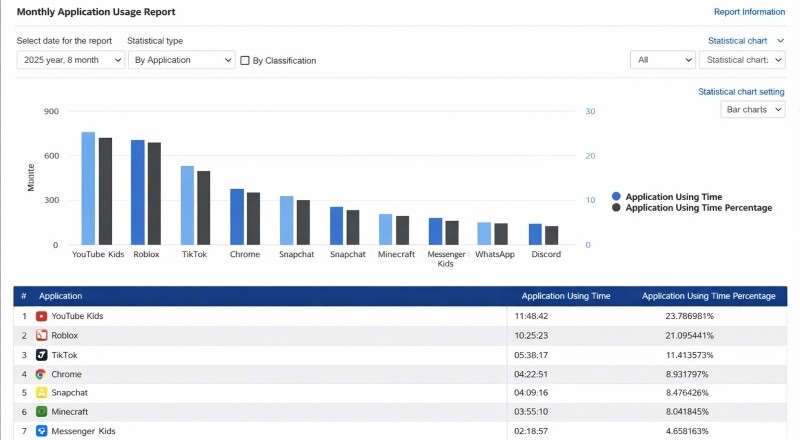
Compared with built-in parental control tools, AnySecura provides much more flexible control. Built-in controls typically operate on rigid rules such as “X hours per day” or “never allow access to certain content,” whereas AnySecura supports different rules for different times of day (after school vs. bedtime), different devices, and different age groups, as well as customized alert levels for specific websites or social behaviors. As children grow, the rules can be dynamically adjusted rather than permanently fixed.
Many parental control tools offer fixed alerts that parents cannot change to match their household rules. AnySecura lets you choose, for every event, between a light notice or a firm alert. You also write the exact text that appears on the child's screen.

AnySecura helps parents go through a positive cycle of setting rules → making them enforceable → observing usage → discussing → adjusting, creating a continuous, constructive loop.
Your child suddenly shifts mood, refuses to open certain apps, hesitates to use the internet or clings to the device more than before. Those changes often act as warning signs. When parental control software runs on the phone or computer, the same signs usually stand out even more.
Pause at that point. Do not question the child, listen instead.
When the child tells you that something online felt upsetting, offer support before you assign blame. Solve the actual problem step by step later. If the child meets judgment or dismissal the first time, the child will probably stay silent afterward.
Keep your voice level. Thank the child for speaking - state clearly that no punishment follows. Plan what to do next together - block a contact, report a post, tighten privacy settings or just switch the device off for a while.
In matters of online safety, trust gives you the best shield.
You should start as soon as your child begins using the internet independently, even if it is just watching videos or playing simple games. Online safety conversations should grow with your child. Keep explanations simple for younger kids and expand the discussion as their online activities become more complex.
If conversations don't seem to work, or you still feel concerned, adding parental control software to manage screen time can provide helpful structure and consistency.
AnySecura allows you to set flexible time limits, filter content, and receive alerts, so the rules you've discussed at home are actually supported in practice.
There is no single number that fits every family. The right amount depends on your child's age, school needs, and daily routine. Instead of focusing only on hours, consider balance: Is your child sleeping well? Staying active? Maintaining offline friendships? If screens begin to interfere with health or mood, adjustments are needed.
Parental controls reduce risk, but they are not a complete solution. Technology works best when combined with open communication and clear family rules. Tools provide guardrails, while conversations build judgment and trust.
Follow this path: understand the risks → talk with your child → set clear and simple rules → use technology to support those rules → create a reasonable safety net. By moving through these steps, you can better protect your child's online safety.
At the same time, remember that this is not a one-time effort. It is an ongoing process. You will need to revisit each step continuously, adjusting your approach and expectations based on your child's age, maturity, and level of understanding. Growing alongside your child—and continuing to learn as they grow—is part of every parent's long-term responsibility.
If you ever feel overwhelmed, a parental control software that evolves with you and your child can make this journey more manageable. Try AnySecura. From your child's very first online experience to the day they develop mature digital awareness, it provides the flexibility you need to adapt, guide, and support every stage along the way.